How to Use MOCs
On this page5 sections
Maps of Content (MOCs) are navigation hubs that connect related knowledge areas. They help you build an interconnected personal knowledge graph.
Core Concepts
- Structure - Organize information into logical topic clusters
- Connections - Create clear pathways between related ideas
- Overview - Provide high-level views of knowledge domains
- Access - Enable quick retrieval of key information
Implementation
- Start with foundational areas like Learning and Career Map
- Use descriptive link text that adds context
- Maintain consistent MOC formatting
- Update regularly as knowledge grows
Best Practices
- Keep each MOC focused and well-scoped
- Add brief descriptions for linked content
- Use tags for cross-referencing
- Follow MOC Best Practices
Organization
- Group related content thematically
- Use clear heading hierarchies
- Include metadata via tags and icons
- Apply Knowledge Organization principles
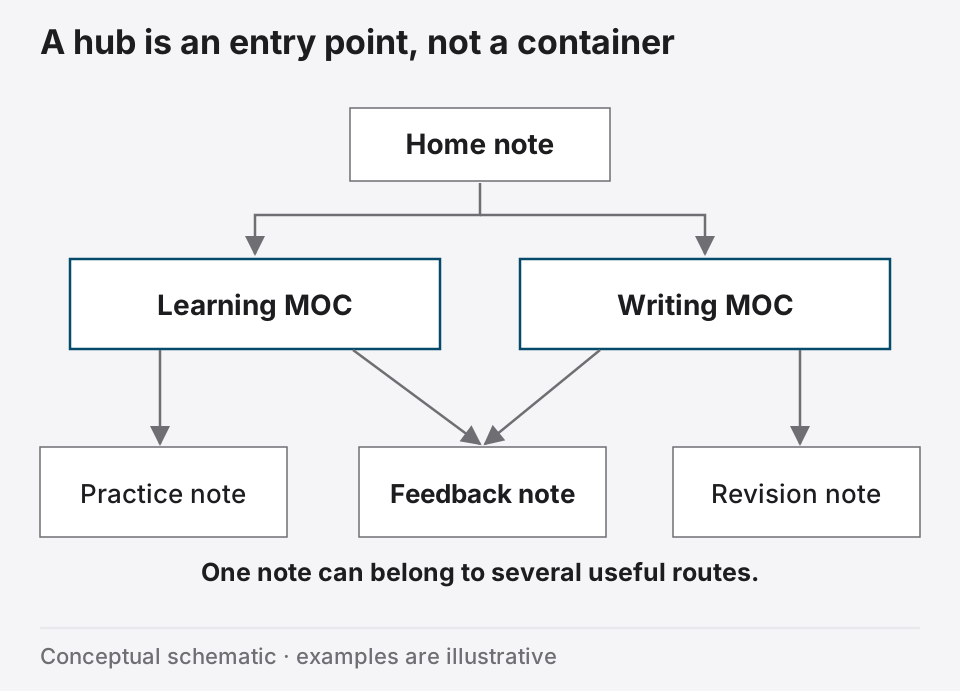
Navigation Flow
- Begin at main hub
- Browse topic MOCs
- Follow contextual links
- Use tag navigation
Tip
Review Regularly Schedule MOC reviews to maintain effective navigation as your knowledge base expands.
Further reading
Nick Milo, Linking Your Thinking
MOCs Overview
Learn how maps of content gather and connect notes while allowing several routes to the same idea.