Remote Work Notes
On this page6 sections
I've worked remotely or hybrid since 2020. These are the practices that stuck.
Remote Work Fundamentals
Setting Up for Success
Physical Workspace
Essentials
- Dedicated work area (even if small)
- Ergonomic chair and desk setup
- Quality monitor(s) - minimum 27" recommended
- Proper lighting (natural + task lighting)
Tech Setup
- Reliable internet (minimum 50 Mbps)
- Backup internet solution (mobile hotspot)
- Quality headset with noise cancellation
- External webcam for better video quality
- Uninterruptible Power Supply (UPS)
Digital Workspace
Core Tools
- Communication: Slack, Teams, Discord
- Video: Zoom, Meet, Teams
- Documentation: Notion, Confluence, Wiki
- Project Management: Jira, Linear, Asana
- Time Tracking: Toggl, Clockify
Developer-Specific
- Code collaboration: VS Code Live Share
- Virtual whiteboarding: Miro, FigJam
- Screen sharing: Tuple, Pop
- Cloud development environments
Communication Excellence
Asynchronous Communication
Best Practices
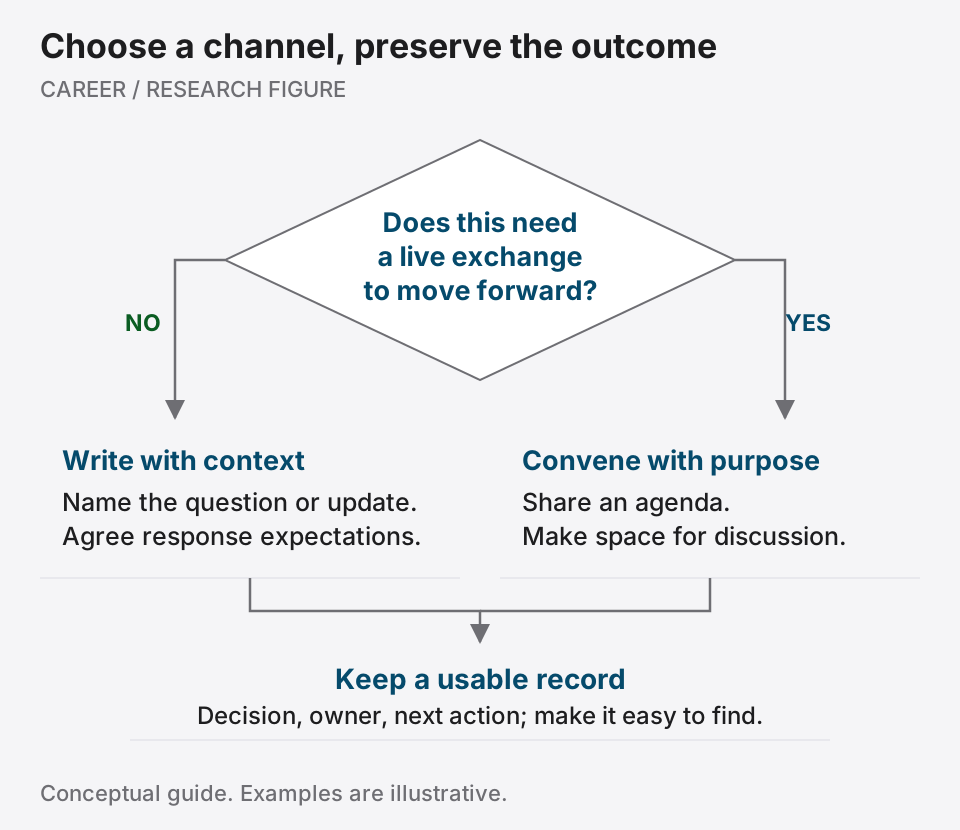
- Write First: Default to written communication
- Be Explicit: Over-communicate context
- Document Decisions: Create searchable records
- Set Expectations: Response time agreements
Effective Writing
- Lead with the main point
- Use bullet points for clarity
- Include all necessary context
- Provide clear action items
- Set response expectations
Synchronous Communication
Video Call Excellence
- Camera on for team building
- Mute when not speaking
- Prepare agenda beforehand
- Record for absent teammates
- Follow up with written summary
Meeting Optimization
- No-meeting blocks for deep work
- Agenda required for all meetings
- Default to 25/50 minute meetings
- Clear outcomes defined
- Action items documented
Time Management & Productivity
Structure Your Day
Morning Routine
- Consistent start time
- Review daily priorities
- Check async communications
- Plan deep work blocks
Work Blocks
- 2-4 hour deep work sessions
- Pomodoro for focused tasks
- Time-boxing for meetings
- Buffer time between calls
End of Day
- Document progress
- Update team on blockers
- Prepare tomorrow's priorities
- Clear separation from work
Managing Across Time Zones
Strategies
- Core overlap hours identified
- Rotating meeting times
- Asynchronous by default
- Clear documentation
- Respect for off-hours
Tools
- World clock apps
- Time zone converters
- Shared calendar visibility
- Automated scheduling
Building Remote Relationships
Team Connection
Virtual Coffee Chats
- Regular 1:1s with teammates
- Informal video calls
- Shared interests channels
- Virtual lunch sessions
Team Building
- Online game sessions
- Virtual happy hours
- Collaborative playlists
- Book/article clubs
Professional Networking
Strategies
- Active in Slack/Discord communities
- Regular LinkedIn engagement
- Virtual conference participation
- Open source collaboration
Visibility
- Share work progress openly
- Contribute to discussions
- Document learnings
- Celebrate team wins
Advanced Remote Skills
Leading Remote Teams
As a Technical Lead
Key Responsibilities
- Set clear technical standards
- Enable autonomous work
- Foster knowledge sharing
- Maintain team cohesion
Best Practices
- Regular architecture reviews
- Pair programming sessions
- Code review culture
- Technical documentation
Managing Distributed Projects
Project Success Factors
- Clear requirements documentation
- Defined communication protocols
- Regular status updates
- Risk management plans
Collaboration Tools
- GitHub Projects
- Linear/Jira boards
- Shared design documents
- Architecture decision records
Remote Career Advancement
Visibility Strategies
Internal Visibility
- Regular progress updates
- Volunteer for visible projects
- Lead technical initiatives
- Mentor team members
External Visibility
- Technical blog posts
- Conference talks (virtual)
- Open source contributions
- Social media presence
Performance Management
Self-Advocacy
- Document achievements
- Quantify impact
- Request regular feedback
- Set clear goals
Review Preparation
- Maintain achievement log
- Gather peer feedback
- Prepare concrete examples
- Plan career discussions
Challenges & Solutions
Common Remote Challenges
Isolation & Loneliness
Solutions
- Schedule regular social interactions
- Join online communities
- Work from co-working spaces
- Attend local meetups
Work-Life Balance
Boundaries
- Defined work hours
- Separate work devices
- Physical workspace boundaries
- Communication boundaries
Communication Gaps
Mitigation
- Over-communicate by default
- Use video for complex discussions
- Document everything
- Regular check-ins
Mental Health & Wellbeing
Daily Practices
- Regular breaks (every hour)
- Physical exercise
- Outdoor time
- Social connections
Long-term Strategies
- Regular vacations
- Hobby development
- Professional boundaries
- Support systems
Tools & Resources
Essential Tools Checklist
- High-speed internet + backup
- Quality audio/video setup
- Ergonomic workspace
- Collaboration software
- Security tools (VPN, 2FA)
Recommended Resources
Books
- "Remote: Office Not Required"
- "The Year Without Pants"
- "Digital Minimalism"
Communities
- Remote Work Summit
- Nomad List
- Remote.co
- We Work Remotely
Courses
- Remote Work Certification
- Async Communication
- Virtual Leadership
Action Plan
Week 1: Foundation
- Optimize physical workspace
- Audit and upgrade tech setup
- Establish daily routines
- Set communication protocols
Month 1: Integration
- Build team relationships
- Master collaboration tools
- Develop productivity system
- Create visibility plan
Quarter 1: Excellence
- Lead remote initiative
- Mentor others in remote work
- Share best practices
- Measure and optimize
Related Notes
- Remote Work
- Communication Skills
- Productivity Systems Hub
- Work-Life Balance
- 5-Year Tech Career Development Plan
- Leadership Development
- Team Collaboration
Further reading
Cornell University Library
Best Practices for Remote Work: Team Guidance
Set communication norms, document decisions and keep remote work coordinated without constant interruptions.